


We utilise industry leading Microsoft 365 Enterprise for Non-Profits platform for our email, document storage, collaboration and online conferencing tools. With the features that Microsoft 365 provides, we’re eager as a District to expand the platform to our Groups and Units. For group management and communicating with parents we use Online Scout Manager.
These tools and hosting would normally cost thousands of pounds year but we are delighted to be able to offer it to Groups and Units for free!
Request Forms
Request a Microsoft 365 account and email
Request an update or change to an Microsoft 365 account
Decommission or suspend a Microsoft 365 account
Request creation of a Microsoft 365 Group or Team
What is Microsoft 365?
Microsoft 365 provides anywhere access to professional email, calendar, HD video conferencing, and more. Designed to help charities do more good, this fantastic suite of tools provides groups with access to Office Online and Microsoft’s best-in-class cloud-based productivity and collaboration software.
What are the advantages of using privately hosted email?
- All emails are hosted on a private enterprise class server meaning potentially sensitive information is kept safe. Free email accounts are consumer products and do not provide users with the same level of privacy, protection or support.
- Data is backed up so you can retrieve something you may have deleted by mistake.
- With a custom domain name such as yourname@4thfrodshamscouts.org.uk as well as advanced security features such as SPF, DKIM and DMARC. Parents and outside organisations can be a lot more confident of your identity when receiving emails and access can be revoked during a suspension or after dismissal. Anyone can set up a free Gmail or Hotmail account with something similar to 4thfrodshamscouts@gmail.com and pose as a leader. We want to make sure our adult members are protected from identity theft and safeguard our young people from imposters.
- A Scouting email address allows you to manage and maintain a Scout-Life balance by keeping your Scouting mailbox separate from your personal inbox. Going on that well earned holiday? Temporarily turn off your Scout email without interrupting your personal emails.
- Microsoft 365 has the ability to send and share documents as protected links requiring the recipient to authenticate rather than sending as unprotected attachments.
- It looks professional. Quite often Scouting will lead you to have contact and dealings with public officials, MPs, Councillors, Business leaders or grant funders and having your own official scout email address will give a much better impression.
- When your group sign up for the system, you will automatically get a address book of all the people in your own group as well Mersey Weaver which will update as people join the organisation and leave – so you can always get hold of the people you need to and respect the privacy of those who have left.
- Centrally managed distribution lists can be setup so that you can be confident everyone who is supposed to receives your email.
What else does my Group get?
By hosting your Group’s email with us, you will receive for FREE:
- a free domain name provided by us (e.g. 1stdoncasterscoutgroup.org.uk, 4thdoncasterscoutgroup.org.uk)
- Secure personalised business class email, calendar, and contacts with a 50 GB inbox (Microsoft Exchange)
- Personal File storage and sharing with 1 TB of OneDrive storage
- Collaboration services to securely store & backup documents (SharePoint). Essential for succession planning.
- Unlimited online meetings, instant messaging, audio, HD video, and web conferencing (Teams)
- Secure social media and networking platform (Yammer)
- Power Automate for Automation of processes and integration with third party services.
- Microsoft Forms for secure data collection.
- Web versions of Word, Excel, Powerpoint and more
- Kanban style management tools to help teams create plans, organise, assign and collaborate around tasks (Microsoft Planner).
- Professional digital storytelling tools to create interactive reports, presentations, newsletters and more (Microsoft Sway)
- District-based technical support when you need it.
- Access to the Doncaster Danum members area based on SharePoint.
- Access to the District Directory
- Full GDPR compliance & alignment.
What is Teams?
Microsoft Teams is a unified communication and collaboration platform that combines chat, video meetings, file storage (including collaboration on files), and application integration. The service integrates with our Microsoft 365 subscription and features extensions that can integrate with non-Microsoft products.
Microsoft Teams is a comparable to services such as Slack, WhatsApp and Zoom and is the evolution from Skype for Business. Teams allows communities, groups, or teams to join online voice or video meetings through a link or invitation or host live broadcasts as well as direct message, have group chats and share or collaborate on documents.
- Video conferencing
- Webinars
- Live broadcasts
- Screen sharing
- Chat & instant messaging
- File sharing
- Document collaboration
- Apps and workflows
What is Online Scout Manager?
Online Scout Manager (OSM) is a youth management system and platform for Scout Groups and Explorer Sections. As well as managing personal data it enables leaders to email parents, track badge progress, organise and publish a programme, track growth, manage event attendance, handle payments, claim gift aid, maintain and inventory of equipment and much more!
How do I access OSM?
Access to Online Scout Manager is given to you once you have completed a DBS, GDPR training and been issued with a Scout email account. Your Group Lead Volunteer or 14 – 24 Team Leader will give you access using your Scout email.
What are the advantages of OSM
- GDPR compliant data storage.
- All data related to running your section in one place.
- Time and effort completing admin.
- Data is accessible to everyone in the group that needs it
- No more paper! Better for the environment and on your purse!
- Smooth handovers when leadership changes / volunteers join and leave.
- Smooth transfers between sections and groups
- No trips to the bank or wasted time collecting forms, cash or cheques.
- Easy gift aid claims
What does my Group/Unit get?
We recommend every section/unit has a Gold+ Subscription. Included in the package is the ability to:
- Send emails and newsletters with read receipts
- Track Attendance register
- Track Badge records & calculate eligibility
- Share badge progress with parents
- Badge stock & shopping lists
- Plan your programme
- Manage events and attendance
- Massive activities database
- Parent rota
- Quartermaster’s database
- Parents can pay for events and fees
- Parents can sign up to events
- Parents can view the programme
- Parents can see their child’s badge progress
- Parents can keep their contact and medical info up to date
- Collect payments via direct debit or credit/debit card.
- Parents always kept informed with automated emails
- Integration with the Gift Aid system for easy claims
- Census Aggregator
- Expense Tracking + Receipt Uploads
Where can I find help?
You can find help from within Online Scout Manager it self via the help menu in the bottom right. Alternatively why not ask in the OSM WhatsApp channel and see if another leader in the district can help you?
Setting up the OSM Waiting List
You first need to create a waiting list section – if you don’t have one yet, expand the section selector drop-down at the top of the menu and click Register New Section and add a waiting list to your group.
Then purchase the Parent Portal Personal Details upgrade in the waiting list section.
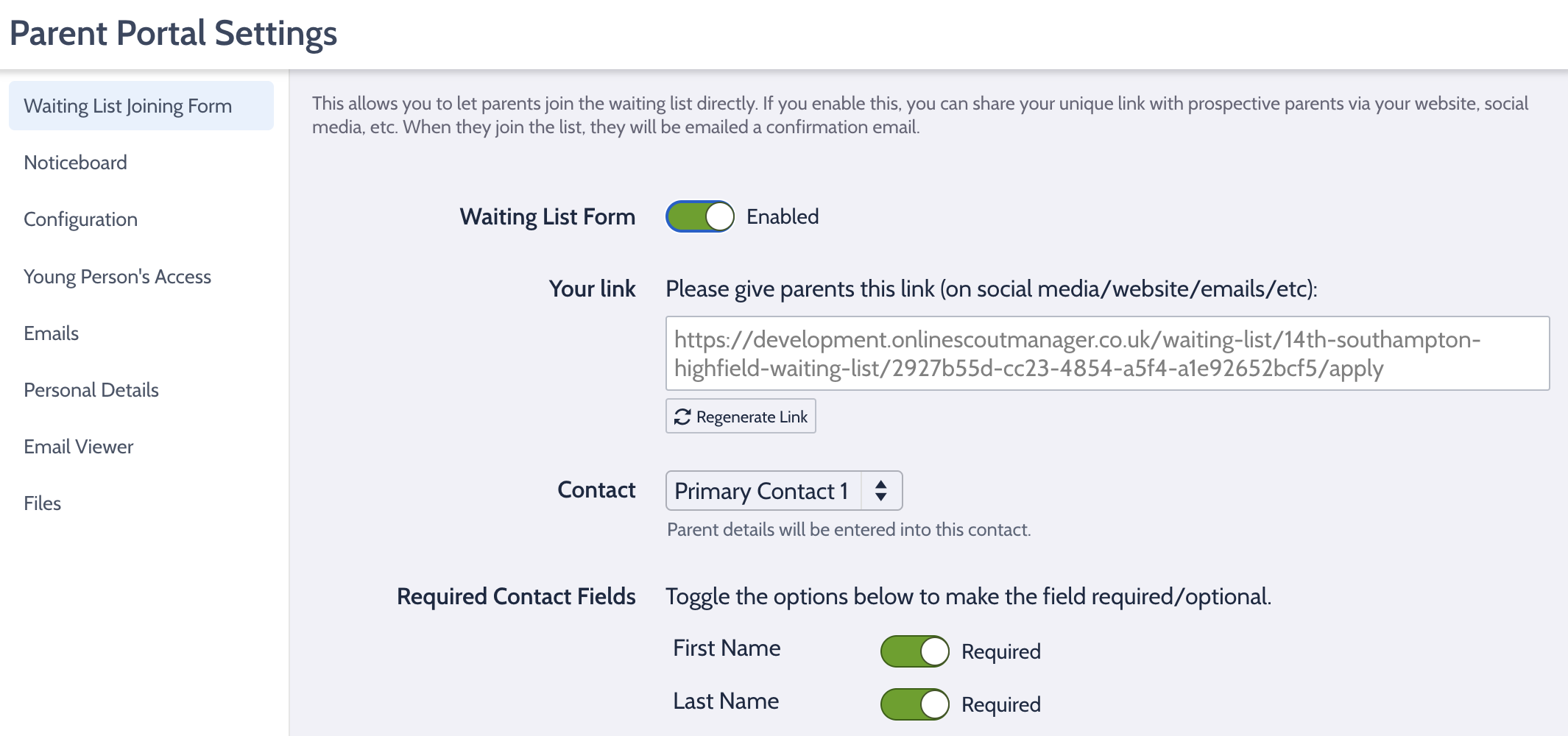
Then go to Settings – Parent Portal Settings – Waiting List Application Form.
You will then be able to generate a unique link to publish on your social media, website, etc. You can also control which fields parents should fill in for their child.
Suggested Template for ‘Thank you’ email: (please replace XXth with your group name but leave the fields in [ ] as they are needed for OSM.
Dear Parent/Carer,
Thank you for your interest in joining the XXth Doncaster Scout Group.
This email confirms that [MEMBER_FIRSTNAME] has been added to our waiting list. We currently have more young people wanting to join than we have spaces available, so there may be a short wait before a place becomes available.
Scouting is entirely volunteer led, and the number of young people we can offer places to depends on the number of adults who are able to help support our activities.
If you would be interested in helping in any way, even occasionally, we would love to hear from you. Many parents choose to support us by helping at meetings, assisting with activities, or joining the leadership team. In some cases this can also help us create more spaces for young people.
We also run a parent helper rota, where parents are asked to help at one session per term. This usually involves supporting games or activities and is a great way to see what your child gets up to in Scouts. No special skills are needed and our leaders will guide you.
If you would like to offer help or find out more, please reply to this email.
As soon as a place becomes available we will be in touch to invite [MEMBER_FIRSTNAME] along to a meeting.
Thank you for your patience and for your interest in Scouting.
Kind regards,
The Leadership Team
OSM District Templates (Parent Portal Settings within each section)
To help improve communication with parents across the district, we have created a series of recommended email templates for use within Online Scout Manager (OSM).
These templates are designed to help groups:
- Communicate clearly and consistently with parents
- Reinforce key expectations such as uniform, attendance and the parent helper rota
- Reduce admin for section leaders by using well written automated messages
Templates should be applied within each section in OSM (for example Squirrels, Beavers, Cubs and Scouts).
Where to Find the Templates in OSM
You can add or update these templates in the following location within Online Scout Manager:
Settings → Parent Portal Settings → Emails → Templates
Once updated, OSM will automatically use these messages when sending emails to parents.
Tip: Many of these emails are automated notifications, so taking a few minutes to update them will improve communication with parents throughout the year. (please leave the fields in [ ] as they are needed for OSM.
Suggested Template for ‘Payment notification when parents have chosen to pay automatically for everything’:
Hi,
This is a quick notification to let you know that an automatic payment of [PAYMENT_AMOUNT] will be taken for [PAYMENT_NAME] on [PAYMENT_DATE] under the [SCHEDULE_NAME] payment schedule for [MEMBER_FIRSTNAME].
No action is required from you as this payment has already been approved.
You can view the payment status or details at any time using the link below:
[DIRECT_LINK]
Thank you for your continued support.
Suggested Template for ‘Payment request for parents that haven’t chosen to pay automatically’:
Hi,
A payment of [PAYMENT_AMOUNT] is due for [PAYMENT_NAME] under the [SCHEDULE_NAME] payment schedule for [MEMBER_FIRSTNAME].
Please arrange payment through Online Scout Manager by [PAYMENT_DATE] using the link below:
[DIRECT_LINK]
If you have any questions regarding the payment, please contact the section leadership team.
Thank you for your continued support.
Suggested Template for ‘Payment notification for payment in the past for parents who pay automatically’:
Hi,
This is to confirm that a payment of [PAYMENT_AMOUNT] has been taken for [PAYMENT_NAME] under the [SCHEDULE_NAME] payment schedule for [MEMBER_FIRSTNAME].
You can view the payment details using the link below:
[DIRECT_LINK]
Thank you for your continued support.
Suggested Template for ‘Payment request for a payment in the past that needs approval’:
Hi,
Our records show that a payment of [PAYMENT_AMOUNT] for [PAYMENT_NAME] relating to [MEMBER_FIRSTNAME] is still outstanding.
Please arrange payment as soon as possible using the link below:
[DIRECT_LINK]
If you have any questions about this payment, please contact the section leadership team.
Thank you for your support.
Suggested Template for ‘Payment initiated’:
Hi,
This is to let you know that a payment of [PAYMENT_AMOUNT] has been initiated for [PAYMENT_NAME] for [MEMBER_FIRSTNAME].
You can view the payment details using the link below:
[DIRECT_LINK]
Thank you for your support.
Suggested Template for ‘Payment reminder’:
Hi,
This is a reminder that a payment of [PAYMENT_AMOUNT] for [PAYMENT_NAME], relating to [MEMBER_FIRSTNAME], is now overdue.
Please arrange payment as soon as possible using the link below:
[DIRECT_LINK]
If you have any questions or are experiencing any difficulties with payment, please contact the section leadership team.
Thank you for your support.
Suggested Template for ‘Event Invitation’:
Hi,
You have been invited to book [MEMBER_FIRSTNAME] onto the following event:
Event: [EVENT_NAME]
Date: [EVENT_DATES]
Location: [EVENT_LOCATION]
Cost: [EVENT_COST]
Please confirm whether [MEMBER_FIRSTNAME] will be attending by visiting the link below:
[DIRECT_LINK]
Further details about the event are included below.
[EVENT_DETAILS]
Thank you.
Suggested Template for ‘Event Invitation Reminder’:
Hi,
This is a reminder to let us know whether [MEMBER_FIRSTNAME] will be attending [EVENT_NAME].
Date: [EVENT_DATES]
Cost: [EVENT_COST]
Please confirm attendance using the link below:
[DIRECT_LINK]
Your response helps us confirm numbers and final arrangements for the event.
Thank you.
Suggested Template for ‘Event Attendance Reminder’:
Hi,
This is a reminder that [MEMBER_FIRSTNAME] is booked to attend [EVENT_NAME] on [EVENT_DATES].
You can view the full event details using the link below:
[DIRECT_LINK]
If you have any questions, please contact the section leadership team.
Thank you.
Suggested Template for ‘Parent Rota Reminder Email’:
Hi,
This is a friendly reminder that you are on the parent helper rota tomorrow. Thank you for volunteering to support the session, we really appreciate it.
A couple of things that help the evening run smoothly:
Arrive around 15 minutes before the start
This gives you time to introduce yourself to the leader running the session and see what activities are planned.
Try to avoid working with your own child
We’ve found young people get more out of the session when parents help with other groups rather than their own child.
Be ready to get involved and have fun
Most of the time it’s simply helping with a game or activity. No special skills are needed and our leaders will guide you.
Session notes for tomorrow are included below:
[PROGRAMME_NOTES]
If you enjoy helping out and would like to get more involved, please speak to one of the leaders.
Thank you for helping us run great sessions for the young people.
Thank you,
Suggested Template for ‘Badge Awarded Email’:
Hi,
[MEMBER_FIRSTNAME] has recently been awarded the following badge(s):
[BADGE_LIST]
Well done to them for their great work.
To help keep uniforms looking smart, please sew these badges onto [MEMBER_FIRSTNAME]’s uniform before the next meeting.
You can find a guide showing where each badge should be placed here:
https://doncasterscouts.org.uk/information-for-parents/all-about-badges
You can also view the badge details using the link below:
[DIRECT_LINK]
Thank you for your support.
Thank you,
Suggested Template for ‘Request for census information’:
Hi,
Each year The Scouts ask all groups to provide anonymous statistics about our membership as part of the annual Scout census. This helps the organisation understand who we support and ensures Scouting remains inclusive and accessible.
To complete this, we need to confirm a few details for [MEMBER_FIRSTNAME] [MEMBER_LASTNAME], including gender, ethnicity and health information.
If you could please take a moment to complete the form using the link below it should take less than 15 seconds.
[DIRECT_LINK]
The information is stored securely within Online Scout Manager and is used only for census reporting purposes.
Thank you for your support.
Thank you,
Suggested Template for ‘Gift Aid Declaration’:
Hi,
A vital part of our group’s funding comes from the Government’s Gift Aid scheme, which allows us to claim 25p for every £1 donated to the group. This includes the membership fees you pay for [MEMBER_FIRSTNAME].
Gift Aid does not cost you anything. It simply allows us to reclaim tax on your donation, providing valuable extra funding that helps us deliver activities, equipment and experiences for the young people.
If you are a UK taxpayer, your Gift Aid declaration increases the value of your membership fees by 25% at no extra cost to you.
For example, if a family pays £100 in membership fees, Gift Aid allows us to claim an additional £25 from the Government. Across the whole group this can generate hundreds or even thousands of pounds each year, helping us provide better equipment, activities and opportunities for the young people.
Please take a moment to confirm your Gift Aid declaration using the link below. It takes less than 20 seconds to complete.
[DIRECT_LINK]
If your details are already correct, simply click the button at the bottom of the page to confirm they are still valid.
Thank you for supporting Scouting and helping us provide great opportunities for our young people.
Thank you,
Any help you need in implementing these please do let us know.
